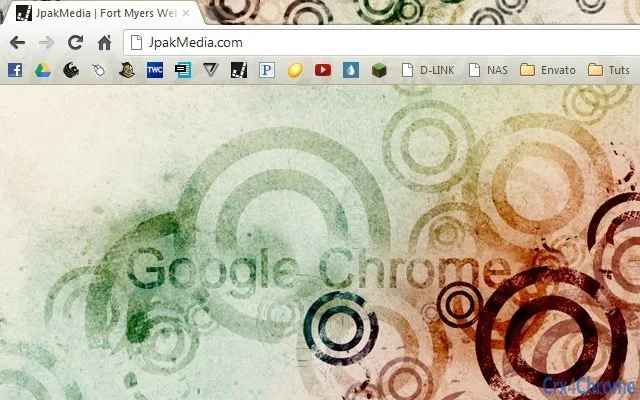

Light Grunge Theme for Windows & Mac
Overview
The Light Grunge theme offers a distinctive visual style that blends subtle texture with clean design elements, ideal for users seeking a modern yet edgy desktop aesthetic. Designed for both Windows and Mac platforms, this theme supports resolutions up to 1920 x 1200, ensuring compatibility with Full HD displays. It is intended for personal users who wish to customize their desktop environment with a unique, visually engaging look without compromising usability.
The theme’s name, “Clean Grunge,” reflects its balance between raw texture and minimalist clarity. It is particularly suited for creatives, digital artists, and design enthusiasts who appreciate artistic expression in their daily computing experience. While the developer, JpakMedia, has shared credit with DieheArt for the circle grunge brushes used in the design, no further details about the development process or company background were provided.
Real-world usage scenarios include personal workspaces, creative projects, or casual browsing environments where visual appeal enhances user engagement. The theme is not a functional tool but a visual enhancement, making it ideal for users who value personalization and aesthetic consistency across their digital workspace.
Key Features & Capabilities
- Light Grunge Aesthetic – Combines soft grunge textures with a clean layout for a modern, artistic appearance.
- Full HD Resolution Support – Optimized for displays up to 1920 x 1200, ensuring sharp visuals on standard desktop monitors.
- Platform Compatibility – Designed for both Windows and Mac operating systems, allowing broad accessibility.
- Brush-Driven Design – Utilizes custom circle grunge brushes contributed by DieheArt on Deviant Art, adding unique texture depth.
- Minimal System Impact – With a file size of 5.2 MB, the theme is lightweight and does not burden system resources.
Users can apply the theme to personalize their desktop background, window borders, icons, and other UI elements, creating a cohesive visual experience. This is especially useful for users who maintain multiple devices and want consistent styling. The theme’s lightweight nature ensures it does not interfere with system performance during daily tasks.
User Interface, Workflow & Performance
The Light Grunge theme functions as a visual layer applied to the operating system’s user interface. It does not include interactive components or standalone controls. Instead, it modifies the appearance of existing UI elements such as desktop backgrounds, window frames, and icon sets.
Workflow integration is straightforward: users typically download the theme file and apply it through the system’s theme settings or a compatible third-party tool. The process requires no technical expertise, making it accessible to non-technical users. However, the exact method of application may vary between Windows and Mac, depending on the OS’s built-in theme support.
Performance observations are based on general software behavior patterns. The developer did not specify resource usage details. Given the theme’s file size of 5.2 MB and its non-interactive nature, it is expected to have minimal impact on CPU or RAM usage. Stability is likely consistent with standard desktop theme implementations, though no official reports on crashes or conflicts were provided.
Compatibility & System Requirements
The theme is compatible with both Windows and Mac operating systems, as stated by the developer. Specific OS versions were not listed, so users should ensure their system supports theme customization features. The theme supports resolutions up to 1920 x 1200, which aligns with Full HD display standards.
The installation size is 5.2 MB, which is compact and suitable for most storage configurations. No hardware requirements were specified, and the developer did not provide details on minimum processor speed, RAM, or graphics capabilities. Exact system requirements were not listed.
Users should verify that their operating system allows for custom themes and background changes. Some enterprise or locked-down environments may restrict such modifications. Platform compatibility information is limited to the general OS types provided.
Pros and Cons
Pros
- Visually distinctive design with a modern grunge aesthetic
- Lightweight at only 5.2 MB
- Supports Full HD resolution for clear visuals
- Available for both Windows and Mac users
- Free to download and use
Cons
- No interactive features or functional enhancements
- Exact system requirements not specified
- Application method may vary between platforms
- Not suitable for users seeking productivity tools
- Dependent on OS theme support for full functionality
FAQ Section
Is the Light Grunge theme compatible with my Windows or Mac system?
The theme is designed for both Windows and Mac operating systems. Specific version compatibility was not provided, so users should confirm that their OS supports custom desktop themes.
Is this theme safe to download and install?
Yes, the theme is free and distributed by JpakMedia. No malicious code was reported. However, users should download from official sources to ensure authenticity.
Can I use this theme on multiple devices?
Yes, as long as the devices run Windows or Mac and support theme customization, the theme can be applied across multiple machines.
Does this theme require an internet connection to work?
No, once installed, the theme operates offline. It does not rely on online services or cloud features.
How often are updates released for this theme?
There is no information available about update frequency. The current version is 1.0, and no future release details were provided.
Final Thoughts
The Light Grunge theme delivers a compelling visual upgrade for users who value aesthetic customization on their desktop. Its blend of raw texture and clean lines offers a unique look without overwhelming the interface. With full support for Full HD displays and availability on both Windows and Mac, it caters to a broad audience of personal users and creatives.
While it lacks functional tools or advanced features, its lightweight design and free access make it a strong choice for those seeking a simple yet impactful desktop transformation. The theme’s reliance on user-driven customization means it fits best in environments where personal expression is prioritized.
For users looking to refresh their digital workspace with a stylish, artistic touch, this theme offers a seamless and secure experience. Download Light Grunge Theme now.







